New GeoAlarm App Firmware Update for iOS and Android Devices was Released!

New GeoAlarm Application Version 7.10.0 has been released for iOS and Android devices!

New Features:

  1. New automations to support doorbell press, motion detection, and schedule. A new UI and flow will also come with this release of automations.
  2. Users will receive an in app prompt when an update for the app is available.

Improvements:

  1. New Z-Wave add/remove flow from iOS to match with Android.
  2. Updated ‘Stay Signed In’ options to allow for one month before the GeoAlarm application logs you out.
  3. Update the ‘Siren’ icon to match the GeoAlarm panel.
  4. Updated the ‘Device Health’ section for cameras/doorbells to include the ‘WiFi Link Quality’ and the ‘WiFi Signal Level’.
  5. Enhanced the Arm/Disarm snapshot seen in the Activity section so it can be clicked on and expanded.
  6. Live view home control will not allow you to arm stay/away if there is a system trouble.
  7. Updated support for the GeoTSLR translator and takeover module. They are now using the correct icons, and the translator is able to be ‘Bypassed’.
  8. Updated the UI for the video settings section in Android to match iOS.
  9. The microphone on the wired doorbell now opens/closes correction without erroring or leaving the line open.
  10. Added a ‘Wake Up’ feature to GeoCam camera settings. This wakes the camera up when settings are entered for battery powered devices to ensure that settings save properly.

OS Specific Fixes:

ioS

  1. Forget password now gracefully handles users that have an email address to multiple accounts.
  2. Fixed a bug that would cause the login page to lag after switching to a linked account and logging out.
  3. Added a ‘Cancel’ button to the Disarm screen on the ‘Security’ page.
  4. The temperature indicator on the Security page is now only clickable if you click directly on it.
  5. Increased the size of the multi-select ellipses for video events and filters.
  6. Added a ‘Maximize’ button to the portrait view of live video.
  7. Updated the camera SDK so it updates the battery percentage after the camera is completely drained.
  8. Door locks can be properly controlled on the live view home control page without receiving an ‘Oops’ error.
  9. Garage door commands are now working properly in live view home control. This section was not in sync with the actual status of the garage door before.

Android

  1. Restricted user type ‘User’ from being able to access video settings.
  2. Added an icon to the ‘Disarm’ button.
  3. Updated the video settings for the GeoVDVC-B battery doorbell camera to include the option to change the doorbell tone.
  4. Fixed a bug that was causing GeoAlarm doorbells/camera to not playback audio from the device.

New Automations Functionality

  1. Each camera is allowed one motion detection automation. If you want to edit the condition, you just click on the created automation and it will drill into it. There is a delete button once you drill into it if you prefer to start over instead of editing the automation.
  2. Doorbells are allowed one motion detection and one doorbell press automation each. The functionality for doorbell press is the same as motion detection mentioned above.
  3. The new schedule functionality is listed as “Days of the week at set time” in automation. This automation is pretty straightforward, you set a time and days of the week. After those are set, you pick your action and save when you are complete. You can set up multiple automations for this rule.

Buy a GeoAlarm Security System Now? Click Here.

New Feature Alert: Alarm.com Alarm Recap is Coming Soon to GeoArm!

New Feature Alert: Alarm.com Alarm Recap is Coming Soon!

It is being reported that GeoArm Security customers, powered by Alarm.com, will soon be able to view a clear, at-a-glance summary of what happened before, during, and after an alarm, right from the Home dashboard or Activity timeline.

We’re excited to announce Alarm Recap, a new app feature that provides customers with a helpful at-a-glance summary when an alarm takes place at their home or business.

Viewable from the Home dashboard shortly after the alarm, or by tapping the Alarm event in the Activity timeline, Alarm Recap helps customers quickly understand what happened leading up to, during, and after a recent alarm.

Simple to use, just Tap “Activity” and view the all-new Alarm Recap feature in action.

With Alarm Recap, GeoArm customers can:

  • Get a condensed snapshot of key information like what triggered the alarm and who disarmed the system
  • See relevant video clips, system activity, and monitoring station events in one place
  • Better understand how they can minimize false alarms and feel more prepared for future alarms

This feature will be rolled out to customers in the app over the next few weeks. They must have the mobile app version 5.9.7+ for iOS or 5.7.6+ for Android.

Stay informed. Stay in control at the diysecurityblog.com.

GeoArm & 2GIG announce New Firmware Update for EDGE Panel

GeoArm and Nice North America announce new firmware update for 2GIG EDGE security systems.

GeoArm and Nice North America (for 2GIG EDGE Panel) are committed to enhancing customers 2GIG EDGE security system experience with the latest firmware update.

What’s Happening? We’re rolling out the EDGE 1.2 firmware update to eligible panels within our customer-base. This update brings significant improvements in performance and stability to your systems.

Who’s Eligible? All EDGE panels currently on firmware versions 1.0 and 1.1 will receive the update, absolutely free of charge!

When Will This Happen? Starting April 1st, we’ll begin sending OTA updates during daylight hours to ensure minimal inconvenience. Don’t worry, updates will only be sent to disarmed panels. Your panel will reboot once the update is complete. We anticipate completing all updates by the end of May.

What’s Next? In the future, should critical fixes be necessary, we may send OTA updates to your panels. Rest assured, these updates will also be free of charge and accompanied by official email communication beforehand.

Learn how to update the firmware on the 2GIG EDGE Security System powered by GeoArm!

Multi-Location Management using GeoAlarm App

Tap to manage multiple sites using the GeoAlarm Security, Automation and Video Surveillance App.

You can now tap to manage multiple accounts with the GeoAlarm App! This new feature brings convenience and security to your fingertips.

That’s right, with a single login, you can effortlessly control and monitor multiple homes or business locations. Manage your business locations or properties with ease, all within the palm of your hand.

Why hassle with multiple logins when you can streamline your security management? The GeoAlarm App allows you to toggle effortlessly between various sites, providing a unified and efficient control hub.

Experience the power of simplicity and stay connected to your home and business empire wherever you are. GeoAlarm security system customers can now enjoy the ease of managing multiple sites with just one login!

Buy Inexpensive W-Box Wireless Security Products (319, 345 and 433 MHz)

Sleek and stylish, the W Box Technologies wireless mini door/window contacts and wireless pet-immune motion detectors are manufactured with 319 MHz, 345 MHz, or 433 MHz wireless frequency.

W Box wireless door and window alarm contacts are used as part of a security system to help protect a home or business. They are small devices that are typically installed on doors and windows. When the door or window is closed, the two parts of the contact are together, creating a circuit. When the door or window is opened, the circuit is broken, and the alarm system is triggered. This sends a signal to the control panel, which can then alert the homeowner or security company. These devices are wireless, meaning they don’t require any physical connection to the control panel, making them easier to install and less intrusive. They can be particularly useful in helping to detect unauthorized entry or potential break-ins.

W Box wireless motion detectors are used to detect movement within a certain area. They are typically part of a security system and are used to alert the system when unexpected motion is detected. This could be in a home, office, or any other space that requires security. The detectors work by using infrared technology to sense movement and heat, so if an intruder were to pass by the detector, it would sense the movement and heat of the person and trigger the alarm.

Not only are W Box products inexpensive, they are compatible with most existing 2GIG, Honeywell, DSC, GE, ITI, and Qolsys wireless security systems. With exceptional range and over five years of battery life, powered by a lithium battery, these security products are designed for low maintenance.

Save More MONEY with W Box security products powered by GeoArm’s low-cost monitoring services starting at just $8 a month!

Pre-Order the Qolsys IQ PowerG Lock Now!

Pre-Order the all-new Qolsys IQ PowerG Lock from GeoArm.com.

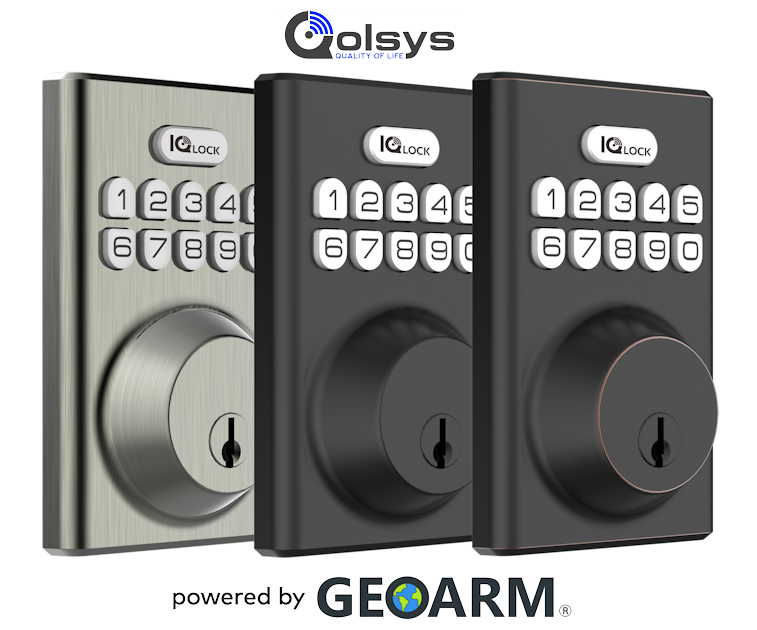
The all-new Qolsys IQ Locks are now on Pre-Order at GeoArm.com. The IQ Locks come available in three aesthetically pleasing finishes; Satin Nickel, Matte Black, and Oil Rubbed Bronze.

The Qolsys PowerG Door Lock is a smart door lock that uses PowerG long-range wireless technology and is designed to provide secure access control to your home or office. The PowerG technology ensures a reliable and encrypted wireless connection between the lock and the Qolsys control panel, offering enhanced security.

The IQ door lock can be easily integrated into your existing Qolsys PowerG-compatible security system and can be controlled remotely through the Alarm.com mobile app or web portal. The IQ Lock also supports keyless entry options such as PIN codes, providing convenience and flexibility for all users

IQ PowerG Lock Features:

  • Better Range – Stable wireless communication over long range applications
  • Easy Installation – Easy configuration for smart locks with PowerG wireless communication
  • Reliable Connectivity – Reduce truck rolls by eliminating unstable wireless network connections
  • High Strength – ANSI Grade 2 certifications brings extra security and piece of mind
  • Attractive Styling – Rubbed Oil Bronze finish allows for the best style fit on certain door colors
  • Compatibility – Qolsys IQ4 NS, Qolsys IQ Panel 4, Qolsys IQ4 Hub, Qolsys IQ Pro, DSC PowerSeries Neo, DSC PowerSeries Pro

Pre-Order the IQ Lock?

Qolsys IQ Door Lock in Satin Nickel Finish (PN: IQDLK-PGK-SN)

Qolsys IQ Door Lock in Matte Black Finish (PN: IQDLK-PGK-MB)

Qolsys IQ Door Lock in Oil Rubbed Bronze Finish (PN: IQDLK-PGK-ORB)

GeoAlarm Firmware Update 1609.06

The newest GeoAlarm Firmware Update 1609.06 is set to elevate the user experience.

GeoAlarm security system clients are going to love the release of firmware version 1609.06, a comprehensive update that promises not just improvements but also a series of new features designed to elevate the user experience to the next level.

Here’s a more expansive sneak peek into what this update brings to the table before we proceed with the broader release to live GeoAlarm systems already installed in the field.

New Features

  • Live Weather Updates: GeoAlarm customers can soon enjoy real-time weather updates directly on the panel display, adding a touch of convenience to their daily routine.
  • Revamped Clone Feature: The new and improved clone feature now allows for smoother setup and transitions between devices.

Significant Improvements

  • Enhanced Wi-Fi Connectivity: We’ve introduced a feature that provides timely notifications in the event of Wi-Fi loss, ensuring uninterrupted connectivity
  • Door Lock Functionality Revamp: Experience heightened security and versatility with the improved door lock functionalities, now supporting extended user code inputs for increased safety.
  • Simplified Camera Integration: The process of adding cameras is now more user-friendly, with intelligent prompt windows to guide users through the process, simplifying the setup and saving valuable time.
  • Optimized Weather Feature Logic: Offering a smoother, more intuitive user interface, this enhancement ensures that users have the latest information at their fingertips without any hitches.
  • Improved Security Protocols: In a bid to ensure utmost security, we have fortified the panel settings, preventing unauthorized access and ensuring peace of mind.

Bug Fixes

  • Enhanced System Stability: We’ve undertaken extensive measures to enhance system stability, ironing out issues that caused unexpected reboots, thus guaranteeing a smoother and more reliable user experience.
  • Grammar and Interface Corrections: To enhance user comprehension, we have corrected several grammar issues and polished the user interface for better readability and understanding.
  • Security Settings Revamped: We have fixed a series of bugs that were affecting security settings, including correcting door lock descriptions and ensuring secure SIM card information display, reinforcing the safety of your system.


We trust that these GeoAlarm system improvements will significantly elevate the user experience, offering not just superior functionality but also a heightened level of convenience and security.

Learn More About the GeoAlarm Security System on Yahoo Finance!

The GeoAlarm Security System as seen on Yahoo Finance!

Reading about the all-new GeoAlarm controller on Yahoo Finance! After 4 years of R&D, GeoArm has launched this smart home security system with built-in technology geared to outperform ADT + Brinks, Ring, SimpliSafe and Vivint (for under $400.00).

By GeoAlarm controller is easy to setup and can be DIY self-monitored and paired with central station alarm monitoring services too. So, what are you waiting for? You can save your MONEY by purchasing the GeoAlarm Security System instead! And, best of all there are no-term contracts and GeoAlarm monitoring plans start at just $8 a month!

Introducing the Qolsys IQR-PG Secondary Touchscreen Wireless Keypad

The all-new Qolsys IQR-PG Remote PowerG Secondardy Touchscreen Keypad has been released!

GeoArm has released the all-new Qolsys IQ Remote PowerG (Part Number: IQR-PG) which is a secondary tablet that pairs with the IQ Panels that include the IQ Panel 4, IQ4 Hub and powerful commercial grade IQ Pro control panels. Not only does it provide a way to arm and disarm your Qolsys IQ control panel and see sensor status, but it gives you the features you don’t get in your mobile app like chimes, emergency panics, and a siren. Running on a full Android 7.1 operating system the IQ Remote IQR-PG can be upgraded over-the-air “OTA” as new software upgrades are released.

The IQR-PG secondary tablet contains a 7″ touchscreen with Wi-Fi connectivity and a backup battery. The IQR-PG allows the user to choose either Wi-Fi or PowerG to easily connect to the IQ Panel. The home screen is divided into three sections. The header shows the date and time, today’s weather (Wi-Fi enrollment only), message center and the Settings tray. The Primary interface shows arming options and sensor status and partition select. The footer shows panic options and additional pages. The IQ Remote PowerG can be set to display digital photos when not in use. This feature, called “Photo Frame”, can be changed or turned off.

Product Features:

  • PowerG – Massive range for secondary control of your home or business
  • 7″ Inch Touch Display – Large, easy to read screen to manage your security system
  • Battery Backup – UL 2610 / ULC-S304 rated including 24-hour backup
  • OTA Upgrades – Upgrades over Wi-Fi or Access Point
  • Smart Home Control – Smart light and lock control from remote locations
  • Panel Compatibility – One remote controller that works with IQ Panel 4, IQ4 Hub and IQ Pro

Verizon CDMA Cellular Sunset Coming Soon for Security Industry

The Verizon CDMA nationwide wireless cellular network shutdown is starting soon!

The Verizon® CDMA Network will be shut down permanently starting December 31st, 2022.

This will be a nationwide event which should be completed within the first week of 2023. Customers with Verizon CDMA communicators may begin to see communication failures and panel keypad faults as early as 11/21/22.

If applicable, please order a new compatible replacement LTE alarm communicator today to avoid any disruption in your alarm monitoring services.

Order Online: https://www.geoarm.com/burglary-intrusion-alarm-communicator-panels.html